
Device binding links a specific device instance to your banking account so that future logins or transaction approvals require that enrolled device. The FFIEC treats this kind of device authentication as one layer in a risk-based control system, not a standalone fix. Used alongside a strong password and active transaction monitoring, it meaningfully cuts the odds that a stranger can log into your account from an unfamiliar phone or laptop.
TL;DR:
- Choose a passkey, hardware security key, or authenticator app over text or email codes, which remain vulnerable to phishing and SIM swaps.
- If a bound device is lost or compromised, revoke it through another trusted device or your bank’s official support line, then change your password.
- Malware can hijack an enrolled phone, and social engineering can trick you into approving fraud, so keep monitoring and fresh checks for sensitive actions.
- Corporate treasury teams should require two separate people to approve high value transfers on separate bound devices, and promptly remove access when staff leave.
Table of Contents
- What device binding means and common forms you’ll see
- How device binding works in practice: typical enrollment and verification flow
- User-facing benefits of device binding
- Limitations and common attack methods that can undermine binding
- What to do if your device is lost, stolen, or replaced
- Standards and regulator guidance shaping secure device binding
- How to enable and verify device binding inside your bank’s app
- Device binding management best practices for institutional and international business users
- Impact of device binding on user privacy and data protection compliance
- Integration of device binding with multi-factor authentication and adaptive risk-based authentication
- Author perspective: priorities for high-value banking relationships
- How we build device-based security into your banking relationship
- FAQ
- Sources
What device binding means and common forms you’ll see
Device binding happens when your bank’s app or website recognizes a particular phone, laptop or security key as “yours” after you complete a verification step, then expects that same device for future access. Enrollment creates a credential tied to that hardware; recognition checks for it on every subsequent login or approval request.
You’ll meet this feature in a few shapes:
- App-based cryptographic binding: your banking app generates a device-specific key during setup and signs future login requests with it.
- Passkeys or security keys: a hardware-backed credential replaces passwords entirely for that device.
- Remembered browser flags: a cookie or token marks a browser as trusted for a set period.
- Authenticator apps: a separate app generates time-based codes tied to the device that installed it.
Possession (something you have) differs from biometrics (something you are) and passwords (something you know); device binding is fundamentally a possession control.
How device binding works in practice: typical enrollment and verification flow
Enrollment generally follows a predictable sequence, though exact screens and device limits vary by institution, so always follow your bank’s own app and support instructions.
- Install the official banking app and sign in with your existing credentials.
- Verify a trusted channel, typically a one-time code sent by SMS or email, or an activation code from a physical letter.
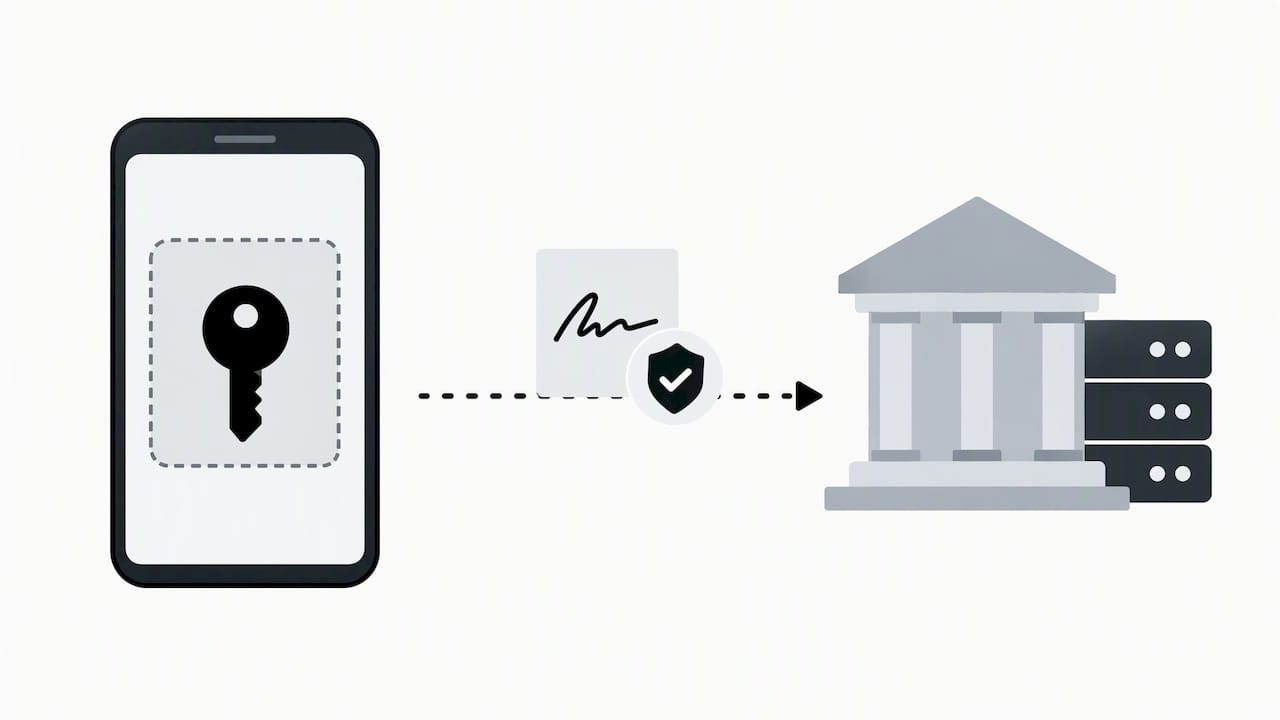
- The app generates a cryptographic key pair on the device, keeping the private key in a secure hardware-backed keystore.
- The device sends its public key to the bank, which stores it against your account.
- On later logins, the bank issues a challenge that only the enrolled device’s private key can sign, or sends a push notification for you to approve.
Variations include QR-code pairing for desktop sessions, authenticator-app codes, and physical hardware keys that plug in or connect over Bluetooth. The strongest setups keep that private key non-exportable, so it cannot simply be copied onto another phone.
User-facing benefits of device binding
A device bound to your account raises the bar for anyone trying to get in with just your username and password.
- Reduces account takeover: a stolen password alone no longer unlocks your account without the enrolled device.
- Blocks credential replay: codes or tokens intercepted elsewhere are useless without the matching device key.
- Strengthens transaction authorization: high-risk actions like large transfers can require a fresh signed approval from your bound device.
- Cuts nuisance prompts: banks often ease up on repeated verification for a device they already recognize, while still applying step-up checks when something looks unusual.
The FFIEC frames this as a layered mitigation for mobile financial services specifically, since phones carry elevated device and application risks compared to a bank’s own infrastructure.
Limitations and common attack methods that can undermine binding
Device binding is a possession check, and possession checks fail in specific, well-documented ways.
- Malware and overlay attacks can hijack a legitimate, enrolled device from the inside, approving fraudulent actions without your knowledge.
- SIM swaps let an attacker intercept SMS-based verification codes by porting your number to a device they control, as explained in detail in how to tell a scam broker from a real one.
- Social engineering convinces victims to approve a push notification or read a code aloud to a caller posing as bank staff.
- Biometric limits mean a fingerprint or face scan unlocks the device credential but cannot be revoked the way a password can if compromised.
NIST requires alternatives to biometric-only activation because biometric matching can fail and is not a revocable secret, so banks typically fall back to a PIN or password as a backup activation method. Device binding works best as one layer among several: a strong credential, an enrolled device, and active fraud monitoring together close gaps that any single control leaves open, as the FFIEC notes when recommending layered mitigation for mobile banking risk.
What to do if your device is lost, stolen, or replaced
Act quickly once you know a bound device is gone or compromised, since every hour it remains active is an hour an attacker could exploit it.
- Open your bank’s app from another trusted device, or call the official support line, and de-enroll or revoke the lost device immediately.
- Change your account password and, where available, switch to a stronger authenticator such as a passkey or hardware security key.
- Contact your mobile carrier right away if you suspect a SIM swap, since that can redirect verification codes meant for you.
- Review recent transactions for anything unfamiliar and ask your bank about freezes or reversals on suspicious activity.
- Re-enroll your replacement device through the bank’s official process only, never through a link in an unsolicited message.
Pro Tip: Save your bank’s official fraud or security phone number in your contacts now, before you ever need it, so you’re not searching for it mid-crisis.
Standards and regulator guidance shaping secure device binding
Three bodies shape how banks design and recommend device binding today.
- The FFIEC treats device authentication, enrollment and de-enrollment, and step-up authentication for sensitive functions as parts of a layered, risk-based control system rather than a single safeguard.
- NIST SP 800-63B favors phishing-resistant public-key authenticators, distinguishing them from manually entered one-time codes, which remain vulnerable to phishing.
- The FTC advises that authenticator apps and security keys protect accounts better than text or email codes.
Authenticator apps and security keys are safer than text messages for two-factor authentication.
The consistent theme: no single device check replaces a full set of layered controls, and higher-value actions deserve stronger, phishing-resistant verification.
How to enable and verify device binding inside your bank’s app
Look for device binding under your app’s security or login settings, often labeled two-step verification, trusted devices, or similar.
- Check the security menu first: most apps group device management, two-factor settings, and trusted-device lists together.
- Choose the strongest option offered: an authenticator app, a passkey, or a hardware security key beats SMS codes when all are available.
- Confirm your recovery settings before finishing enrollment, since a weak recovery path can undo the protection a bound device provides.
- Check how many devices your bank allows, since some limit you to one or two enrolled devices at a time.
- Follow only your bank’s official app or published support process for any enrollment or recovery step, never a link from an unsolicited call, text or email.
For more context on layered protections like these, see our dual authorization banking overview or broader digital banking best practices.
Device binding management best practices for institutional and international business users
Institutional and corporate accounts carry a different risk profile than a personal checking account, and device binding needs to reflect that scale. A single compromised device on a corporate account can expose multiple signers, multiple currencies, and transfers well beyond what a retail fraud team expects to see in a day.
Dual authorization matters more here than almost anywhere else: requiring two separate bound devices, held by two separate people, to approve a high-value transfer closes the gap that a single stolen device leaves open. Treasury and finance teams should maintain a current inventory of every enrolled device per signer, review it on a fixed schedule, and de-enroll devices immediately when an employee changes role or leaves the organization.
International operations add complexity, since business travel, shared devices, and staff across time zones all increase the chance that a device gets lost, replaced, or left unattended. Policies should specify how quickly a lost device must be reported and de-enrolled, and who holds authority to approve an emergency re-enrollment without waiting on a single point of contact.
Hardware security keys tend to outperform app-based binding for institutional signers handling large transfers, since a physical key cannot be phished or cloned the way a code can be intercepted. Pairing that with the step-up authentication the FFIEC recommends for higher-risk remote banking activity gives institutional users a control that scales with the size of what’s actually at stake.
Impact of device binding on user privacy and data protection compliance
Device binding collects and stores information about the hardware itself: a device identifier, a public key, and sometimes a rough location or network signature used to flag anomalies. For high-net-worth individuals and corporate principals, that data trail matters as much as the security benefit, since it becomes part of what a bank holds about a client’s habits and whereabouts.
Well-designed binding keeps the sensitive half of the credential, the private key, on the device itself and never transmits it anywhere. The bank only ever sees the public key and the signed challenge responses, which limits what a data breach on the bank’s side could actually expose. That architecture matters for compliance reviews, since it narrows the scope of personally identifying technical data that needs protection under applicable data protection and AML/KYC frameworks.
Clients who require elevated discretion, numbered accounts, or custody arrangements should ask how device and location data is retained, how long logs are kept, and who inside the institution can access them. A bank built around confidentiality for international and institutional clients should be able to explain its device-data handling in plain terms, not just point to a general privacy policy. Reviewing those answers before onboarding, alongside how enhanced due diligence is scoped for your account tier, helps set expectations around what data a device-bound relationship actually generates.
Integration of device binding with multi-factor authentication and adaptive risk-based authentication
Device binding works best as one input into a broader authentication decision, not a gate that stands alone. A bound device tells the bank “this hardware has been seen before,” while multi-factor authentication adds a second, independent factor such as a password or biometric unlock on top of it.
Risk-based or adaptive authentication goes a step further by weighing context: is this login coming from a bound device, a familiar location, and a typical time of day, or does something look off? When the signals line up, the bank can ease friction for the user. When they don’t, such as a bound device suddenly appearing from an unusual location, the system can trigger step-up verification, exactly the kind of control the FFIEC recommends for higher-risk remote banking actions.
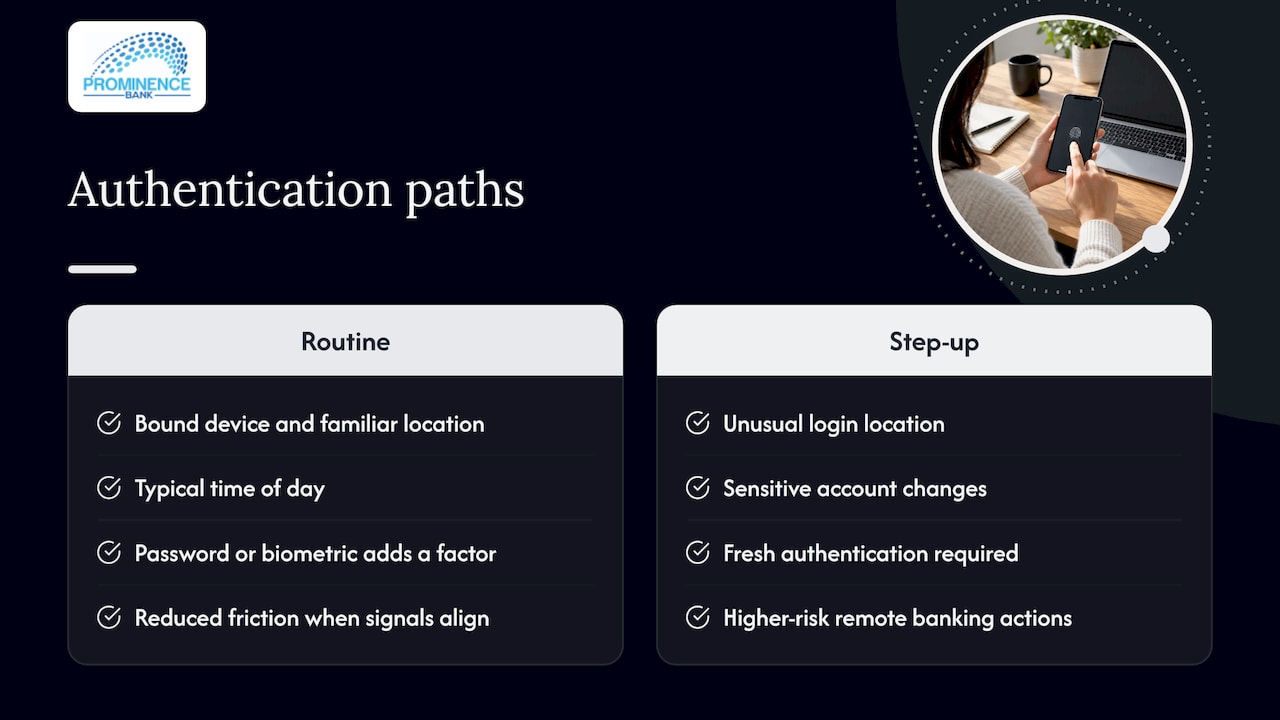
This layered approach means a bound device never fully replaces other factors for sensitive actions like adding a new payee, raising a transfer limit, or changing account recovery details. Those actions should still prompt a fresh authentication step even on a trusted device. For readers managing accounts with dual authorization requirements, adaptive checks on top of device binding give a second, independent layer that a single stolen credential or cloned device can’t satisfy alone.
Author perspective: priorities for high-value banking relationships
For accounts moving significant sums, I’d skip SMS codes entirely and insist on passkeys or hardware security keys, since they resist phishing in ways manually typed codes never will. Lock down recovery channels just as tightly. Our security resources for high-value clients reflect that same priority: the device matters less than what happens when it’s lost.
— Harold
How we build device-based security into your banking relationship
We built our security approach around the reality that clients need more than a password and a prompt. Our accounts incorporate layered authentication and device-level controls designed to enhance account security.
- Some of our accounts come with discretion and layered verification across account types.
- Our business banking relationships support the dual authorization and device management that institutional treasury teams rely on.
- Enhanced due diligence tiers, from standard to critical complexity, are listed with their associated fees so you know what to expect before you apply.
Opening an account starts with a bank account opening fee of $25,000, with a numbered account opening set at €50,000 and a $100 or €100 monthly numbered account fee. If a banking relationship with strong device-based controls and dedicated support for complex, international structures fits what you need, visit our business account application page to start the conversation.
This article is general information, not a substitute for advice from a qualified financial advisor. Consult a qualified financial professional about your own circumstances before acting on anything here.
FAQ
Which is safer, online banking or telephone banking?
Online banking with device binding and multi-factor authentication generally resists impersonation better than telephone banking, where a caller can be socially engineered into revealing information. The FTC specifically warns against sharing verification codes with anyone who calls you, since legitimate bank staff never need that code read aloud.
What is the 3-6-3 rule in banking?
The 3-6-3 rule is an informal, older description of traditional retail banking: pay 3% interest on deposits, lend at a moderate rate, and be on the golf course by 3 PM. It has nothing to do with device binding or authentication security and reflects a simpler era of banking before digital risk controls existed.
How do I use mobile banking step by step?
Download your bank’s official app, sign in with your existing credentials, and complete any identity verification step the app requests, such as a one-time code sent to a trusted channel. From there, enroll your device for recognition, set up your preferred authenticator, such as an authenticator app or passkey, and confirm your recovery options before relying on the app for daily transactions.
What is the UPI device binding process?
UPI device binding, used in India’s Unified Payments Interface system, links a specific registered mobile number and device to a user’s UPI ID, so payment apps on that device can authorize transactions tied to the linked bank account. The exact enrollment steps vary by provider and app, and reflect the same underlying principle covered throughout this guide: tying payment authorization to a specific, verified device.
Sources
- FFIEC IT Examination Handbook InfoBase – II.C.16 Customer Remote Access to Financial Services
- SP 800-63B-4, Digital Identity Guidelines: Authentication and Authenticator Management
- Use two-factor authentication to protect your accounts | Consumer Advice (FTC)