A well-built wealth management workflow for clients is the difference between an advisory practice that scales and one that drowns in admin. At its core, this is the end-to-end process financial advisors use to onboard, plan for, and continuously serve clients, covering everything from initial discovery through ongoing portfolio monitoring. Done right, it integrates investment management, tax strategy, insurance, and estate planning into a single coherent client journey rather than a collection of disconnected tasks.
Why does a structured workflow matter so much right now? A few reasons worth naming:
- Consistency: Every client gets the same quality of service regardless of which advisor handles their account.
- Compliance: Documented processes make KYC/AML adherence auditable and repeatable under SEC Regulation Best Interest and similar standards.
- Scalability: Advisors can grow their book without proportionally growing their workload.
- Error reduction: Defined handoffs between stages catch mistakes before they reach the client.
- Client experience: Clients feel guided, not processed, when every touchpoint follows a clear sequence.
The firms pulling ahead in 2026 are not the ones with the most advisors. They are the ones whose financial advisory workflow runs on documented, technology-enabled processes that free advisors to do what actually moves the needle: advice.
What are the core stages of a wealth management client workflow?
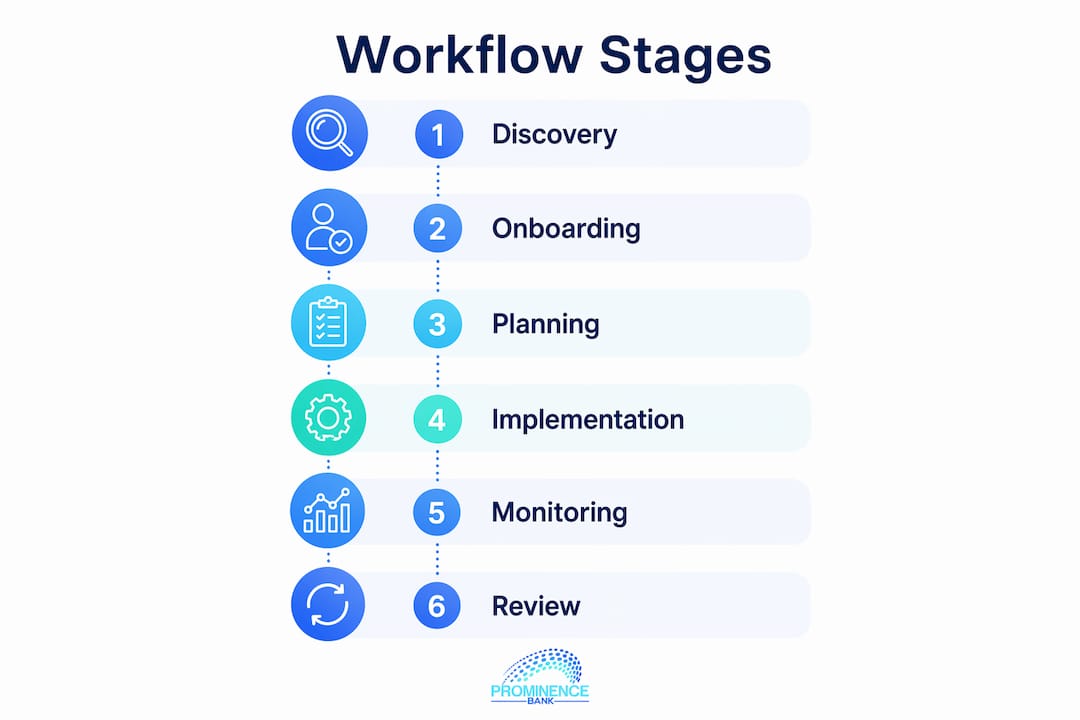
Wealth management workflows typically run through five to six sequential stages, each with distinct tasks that feed directly into the next. The stages are not independent silos. Data collected in stage one shapes every decision through stage six.
- Discovery and goal setting: The advisor learns the client’s financial picture, values, risk tolerance, and life goals. This is also where KYC documentation begins.
- Data gathering and analysis: Income, liabilities, existing accounts, insurance policies, and estate documents are collected and reviewed. Portfolio stress-testing happens here.
- Strategy development: The advisor builds a customized plan covering investment allocation, tax efficiency, retirement timelines, and estate structure.
- Plan presentation: The advisor walks the client through recommendations, adjusts assumptions in real time, and gets sign-off.
- Implementation: Accounts are opened or transferred, trades are executed, insurance policies are placed, and outside professionals (CPAs, estate attorneys) are coordinated.
- Ongoing monitoring and review: Regular meetings, typically quarterly or semi-annually, track progress against goals and adjust for life changes or regulatory shifts.
Each stage also carries its own documentation and communication requirements. During onboarding, for example, the advisor collects signed agreements, identity verification, and suitability questionnaires. During monitoring, the deliverable is a performance report tied to the client’s specific goals, not a generic benchmark comparison. Financial advisor workflows that define these handoffs clearly produce more consistent outcomes and give compliance teams something concrete to audit.
The front office handles client-facing stages: discovery, presentation, and relationship maintenance. The back office handles the operational layer: account setup, compliance documentation, custodian coordination, and data management. Both need defined processes, and both need to talk to each other without requiring an advisor to manually bridge the gap.

How does automation improve the wealth management process?

Automation’s biggest payoff in the investment workflow for clients is not speed for its own sake. It is the elimination of the manual steps that introduce errors and eat advisor time without adding any advisory value.
Digitizing client onboarding reduces onboarding time from weeks to hours and lowers NIGO (not-in-good-order) submission rates, which are one of the most common sources of compliance friction. When a CRM event, such as a prospect converting to a client, automatically triggers document generation, a DocuSign request, a calendar invite, and a prep packet to the client, the advisor shows up to the first meeting with everything already in place.
Key automation benefits worth building into your workflow:
- Automated document generation triggered by CRM status changes
- Scheduled client reminders and meeting prep emails sent without advisor intervention
- Client self-service portals for document uploads, form completion, and progress tracking
- Compliance checklists that auto-populate based on account type and client profile
- Portfolio rebalancing alerts routed to the advisor for review rather than manual monitoring
“Digital-first servicing models route routine requests automatically and shift advisor capacity to high-value advice, meeting the expectation clients now have for real-time updates and self-service access.” — Jump.ai, 2025
Automation also enables a proactive servicing model. Instead of waiting for clients to call with questions, an automated workflow can flag a portfolio drift, trigger a check-in email, and schedule a review meeting before the client even notices the issue. That shift from reactive to proactive is where client engagement measurably improves.
Which technology tools support an efficient wealth management workflow?
The right tech stack does not mean the most software. It means the right integrations, where data flows between systems without manual re-entry.
| Tool Category | Primary Function | Examples |
|---|---|---|
| CRM platform | Central workflow hub, client data, task management | Wealthbox, Redtail |
| Document management | Secure storage, compliance tracking, automated filing | M-Files |
| Financial planning software | Goals-based planning, projections, client collaboration | Advisor360° Planning |
| Client portal | Self-service access, document sharing, secure messaging | Embedded in CRM or planning platform |
| Scheduling and video | Meeting coordination, virtual client reviews | Calendly, Zoom integrations |
Wealthbox and Redtail are the two most widely adopted CRM platforms in independent advisory firms. Both offer custodial data feeds, task automation, and integrations with planning and portfolio tools. Redtail has a longer track record in the RIA space; Wealthbox tends to appeal to advisors who want a cleaner interface with faster onboarding.
M-Files takes a different approach to document management. Rather than organizing files by folder structure, it classifies documents by metadata, so a client’s tax return, account agreement, and estate documents are all retrievable by client name, document type, or date without knowing which folder they were saved to. The M-Files Teams integration connects directly into Microsoft 365 workflows, which matters for firms already running on that stack.
Hubly sits in a different category entirely. It is a workflow management layer that sits on top of CRM systems like Wealthbox and Redtail, adding visual workflow tracking, checklist automation, and team accountability features that the CRMs themselves do not natively provide. For firms with multiple advisors and support staff, Hubly makes it visible who owns each step of a client process and whether anything is stalled.
Advisor360° Planning addresses one of the most persistent friction points in the wealth management process: the gap between the financial plan and everything else. Embedded directly in the advisor dashboard, it pulls account data and CRM context automatically, so advisors build strategies without duplicate data entry. Clients access their plan through the same investor portal where they see their accounts and communicate with their advisor.
Additional tools worth evaluating:
- Portfolio management systems with automated rebalancing and tax-loss harvesting alerts
- E-signature platforms for compliance document execution
- Video conferencing tools integrated with CRM for automatic meeting logging
How do you overcome common workflow challenges with integrated solutions?
The most common reason wealth management workflows break down is not a lack of tools. It is disconnected systems that force advisors to re-enter the same data across CRM, portfolio, and planning software, pulling them away from clients and increasing the risk of decisions made on stale information.
The fix is integration before automation. Firms that automate a broken, disconnected process just produce errors faster. The sequence that works: document the current process, identify where data is being re-entered or where handoffs go silent, then connect those systems before layering automation on top.
“Efficiency is achieved not by adding software, but by integrating workflows into a unified operating system enhanced by AI, allowing advisors to focus on strategic client engagement.” — Oliver Wyman, Wealth Management Trends 2026
Staff training is the other variable that determines whether a new workflow actually sticks. Advisors and support staff need to understand not just how to use a new tool, but why the process is designed the way it is. When staff understand the compliance reason behind a documentation step, they are far less likely to skip it under time pressure.
Automated workflows also need a defined exception-handling path. When a client’s situation does not fit the standard process, such as a complex trust structure or a non-standard account type, the workflow should route the exception to a senior advisor rather than stall silently. Build that escalation path into the workflow design from the start.
Measuring workflow performance requires tracking the right KPIs. The three most useful for most firms are onboarding cycle duration, NIGO submission rates, and meeting prep efficiency. If onboarding takes three weeks and the industry benchmark is closer to three days with automation, that gap quantifies the ROI case for investment. If NIGO rates are high, the problem is usually upstream in the data collection step, not in compliance review.
Pro Tip: Use AI-generated client briefs before every review meeting. Tools that pull from CRM notes, portfolio data, and open tasks can compress meeting prep from hours to minutes, and flag sensitive issues like a recent account withdrawal or a missed action item before the advisor walks into the call.
For advisors managing high-net-worth clients with complex international structures, the private banking onboarding process adds another layer of compliance and documentation requirements. Prominencebank’s approach to secure, digital-first onboarding reflects the same principle: a defined, technology-enabled process reduces friction for the client while keeping compliance controls intact.
Key Takeaways
A structured, technology-integrated wealth management workflow for clients is the foundation for consistent service delivery, compliance adherence, and advisor scalability in 2026.
| Point | Details |
|---|---|
| Six-stage framework | Workflows run from discovery through ongoing monitoring, with each stage feeding the next. |
| Automation reduces friction | Digitizing onboarding cuts cycle time from weeks to hours and lowers NIGO submission rates. |
| Integration before automation | Connect CRM, planning, and portfolio systems before automating to avoid compounding errors. |
| Right tools by function | Wealthbox and Redtail for CRM, M-Files for documents, Hubly for workflow tracking, Advisor360° for planning. |
| KPIs drive improvement | Track onboarding cycle duration, NIGO rates, and meeting prep time to measure workflow ROI. |
FAQ
What is a wealth management workflow for clients?
A wealth management workflow for clients is the structured, repeatable process advisors use to onboard, plan for, and service clients across all financial disciplines. It typically covers six stages from discovery to ongoing monitoring, supported by CRM, planning, and document management tools.
How does automation improve client onboarding in wealth management?
Automation triggers document generation, scheduling, and prep materials from CRM events, reducing onboarding from weeks to hours and cutting NIGO submission rates. The result is a faster, more consistent experience for both the client and the advisory team.
Which CRM platforms are best suited for wealth management workflows?
Wealthbox and Redtail are the most widely used CRM platforms in independent advisory firms, both offering custodial data feeds, task automation, and integrations with financial planning and portfolio tools.
How do you measure workflow efficiency in a wealth management firm?
Track onboarding cycle duration, NIGO submission rates, and meeting prep time as your core KPIs. Firms that document their processes before automating get cleaner baseline data and more accurate ROI measurements.
What role does M-Files play in wealth management document management?
M-Files organizes documents by metadata rather than folder structure, making client files retrievable by name, document type, or date. Its Microsoft Teams integration connects document workflows directly into the platforms advisory teams already use daily.